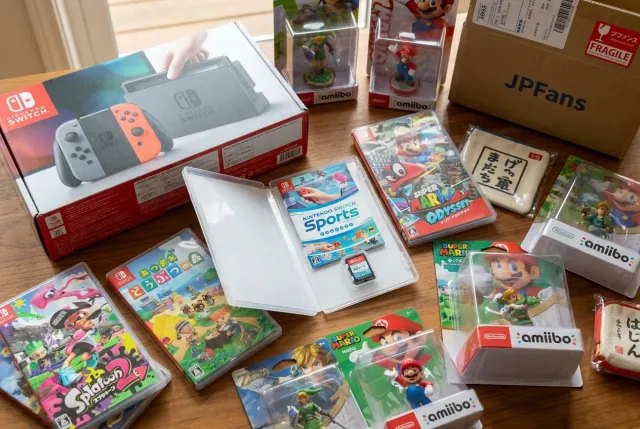
Choosing a Japanese Nintendo console, game, or accessory starts with compatibility: confirm the system’s region behavior, language options, power requirements, included parts, and the exact game format before ordering. Modern Nintendo Switch-family items are often the simplest cross-border choice, while older Famicom, Super Famicom, GameCube, Wii, DS, and 3DS products need closer attention to regional locks, plugs, and physical cartridge differences.
Start with the Nintendo generation you actually want
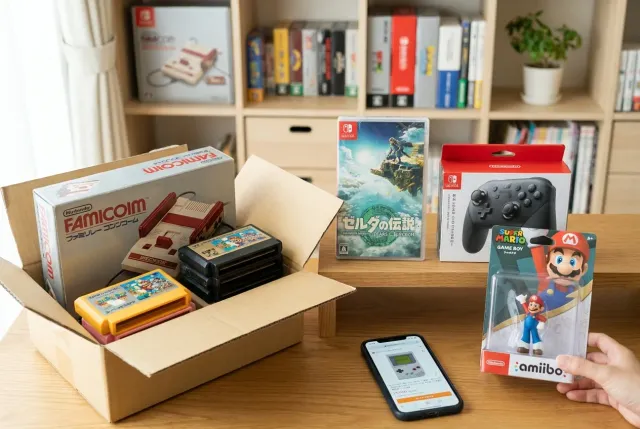
·Japanese Nintendo· can mean anything from a current Nintendo Switch release to a 1980s Famicom cartridge. The best choice depends on whether you want convenient play, a specific Japan-only release, original hardware, or display-worthy collectible items. Decide this before comparing listings, because the compatibility questions change substantially between generations.
Modern Nintendo Switch and Nintendo Switch 2-family items
For many international buyers, Switch-era products are the most approachable Japanese Nintendo purchases. Japanese physical Switch games generally work on Switch consoles from other regions, and Japanese packaging does not automatically mean the game itself is Japanese-language only. Many releases include English, but language support is determined by the individual title and version, not by the country of the box.
When choosing between a standard Switch, Switch OLED model, Switch Lite, or newer hardware, focus on how you plan to use it:
- TV play: Choose a dock-capable console if you want to play on a television. A Switch Lite is handheld-only.
- Portable play: Check the screen, battery condition on used units, weight, and whether a charger is included.
- Physical games: Confirm that the listing is for a game card rather than download-code packaging or an empty case.
- Newer-generation software: Verify the game’s required console generation. A game made specifically for newer hardware may not run on an earlier Switch model.
Nintendo’s official global homepage is a useful starting point for identifying current hardware and official terminology: Nintendo.
Classic Nintendo hardware
Older Japanese systems are often the better choice for enthusiasts who want original artwork, Japanese-exclusive titles, or the authentic experience of a Famicom or Super Famicom library. They also demand more research. Cartridge shapes, connector types, television standards, controllers, memory saves, and region restrictions may all affect whether an item works in your setup.
A good rule is simple: the older the hardware, the less safe it is to assume plug-and-play international compatibility. Treat every classic-system listing as a specific compatibility check rather than relying on broad assumptions about Nintendo products.
Understand region locking before choosing a Japanese console or game
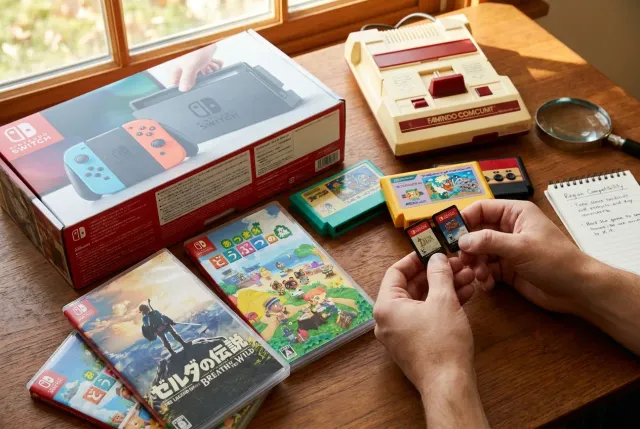
Region compatibility is the most important technical issue when selecting Japanese Nintendo products. It determines whether an imported game will boot on your console and whether an imported console will accept games from your home region.
Systems with relatively flexible game compatibility
Nintendo Switch physical games are broadly region-free. This makes Japanese Switch titles especially attractive if you want alternate cover art, Japanese retail bonuses, or games that received a Japanese physical release. However, region-free does not guarantee that every title has English text, English voice acting, or compatible downloadable content.
For downloadable content, updates, and digital purchases, match the game’s region and your Nintendo Account eShop region carefully. A Japanese game may require Japanese-region DLC, even when the base game runs on a console from another country. Before choosing a title with expansion content, costumes, or season passes, check whether the product listing identifies the exact Japanese edition.
Systems that need closer region research
Many older Nintendo consoles are region-locked or use physically different cartridges. Examples include:
- Famicom and Super Famicom: Japanese cartridge formats differ from their NES and SNES counterparts. Compatibility may require appropriate original hardware or a suitable adapter, depending on the system and cartridge.
- Nintendo 64: Japanese and North American cartridges use similar electronics but have different physical shell designs. Console cartridge trays and adapters can matter.
- GameCube, Wii, and Wii U: These systems have meaningful regional restrictions for physical software. A Japanese console is not automatically the best choice for a collection of overseas games.
- Nintendo DS and Nintendo 3DS: Original DS compatibility is more flexible in many cases, while 3DS software and systems are generally region-locked. DSi-enhanced titles may also involve regional considerations.
Do not assume that a Japanese console will play every Japanese game either. Some accessories, online functions, peripherals, and special editions were designed for particular models or regional releases. Check the console’s exact name, model number, and intended software generation.
Check language support, not just the country of release
A Japanese game can be a great option for an English-speaking player, but only when its language options meet your needs. Some Japanese releases include English menus and subtitles; others are fully Japanese. In older games, English support is far less common, so assume Japanese-only unless the listing, box, manual, or reliable title information confirms otherwise.
Use these checks before selecting a game:
- Look for language details in the listing photos, including the back of the case and screenshots.
- Check whether the product is a Japanese domestic release, an Asian multi-language release, or an international version with Japanese artwork.
- For story-heavy RPGs, visual novels, simulation games, and educational software, confirm text language especially carefully.
- For arcade-style, puzzle, fighting, rhythm, and sports games, Japanese-only menus may be less of a barrier, but gameplay instructions can still matter.
- For Switch games, remember that language can sometimes change according to the console language setting, but this is title-specific.
Console interface language is a separate question. Modern Nintendo hardware often offers multiple system languages, while older Japanese systems may have Japanese menus, settings screens, or documentation. If you are choosing classic hardware as a first-time owner, factor in how comfortable you are navigating Japanese system menus.
Choose a console condition that matches your purpose
Condition matters differently for a daily-use console, a complete collector set, and a display item. Start by deciding which details are essential to you: working hardware, original packaging, clean screens, matching serial labels, or all original accessories. Then read the listing title, description, and photos as a complete record rather than relying on a single condition word.
Useful Japanese condition terms
Japanese listings may use terms that communicate a general condition, but photos remain essential:
- 未開封 (mikaifu): Unopened. This usually refers to sealed packaging, though it is still wise to inspect photos for storage wear or seal condition.
- 美品 (bihin): A very clean or beautiful-condition item. It is subjective, so check for scratches, yellowing, screen marks, and missing items.
- 初版 (shohan): First edition or first printing. This can matter for collectors, manuals, packaging variations, and certain game releases.
- 動作確認済み (dousa kakunin-zumi): Operation checked. Read what was tested; powering on is not necessarily the same as testing every port, button, save function, or disc drive.
- ジャンク (junk): Sold as-is, often faulty, incomplete, untested, or intended for repair and parts. Choose only if you understand the risk.
For handhelds, look closely at screen yellowing, dead pixels, touch-screen response, hinge condition, battery swelling, stylus inclusion, and cartridge-slot wear. For home consoles, inspect controller ports, AV ports, disc-tray behavior, cartridge connectors, rubber feet, shell discoloration, and evidence of corrosion around battery compartments.
If a listing includes a box, manual, inserts, or limited-edition outer sleeve, confirm whether those parts are original and whether they are included in the stated set. ·Console only· may mean no controller, no power supply, no cable, and no packaging.
Match Japanese power, display, and connection needs to your setup
A Japanese console is usually designed for Japan’s electrical and television environment. Modern devices are generally easier to connect than vintage systems, but never assume an included power supply is suitable for your local mains voltage.
Power supplies and plugs
Japan commonly uses 100V power. Some Nintendo AC adapters accept a wider input range, while others are designed only for Japanese voltage. Read the voltage information printed on the adapter itself or shown in listing photographs. A plug that physically fits an outlet does not prove that the voltage is appropriate.
When possible, use an official power supply designed for your local region and compatible with the exact console model. For USB-C hardware, use reputable equipment that meets the console’s power requirements. For vintage consoles, a suitable voltage converter may be necessary when using an original Japanese adapter.
Video output and cables
Connection type is another major dividing line between generations. Switch-era docked systems use HDMI, making them straightforward for most current televisions. Older Nintendo consoles may use RF, composite AV, S-Video, RGB, proprietary multi-out cables, or region-specific connectors.
Before buying a classic Japanese console, confirm:
- Which video output the exact console model has.
- Whether the listing includes the correct cable.
- Whether your television or monitor accepts that signal.
- Whether you need an adapter, scaler, or separate cable for your display.
- Whether the console’s refresh-rate behavior is suitable for your equipment.
A console can be fully functional and still be inconvenient if the included cables do not work with your television. Build the total setup around the display you already own, rather than choosing cables as an afterthought.
Select accessories by model number and function
Japanese Nintendo accessories can be practical upgrades, hard-to-find replacements, or collection highlights. They can also be easy to misidentify. A controller may look correct but fit only a particular revision, port, or regional system. Always match an accessory to the exact console model rather than the brand name alone.
Common accessory categories include controllers, Joy-Con, docks, charging grips, AC adapters, AV cables, memory cards, styluses, carrying cases, sensor bars, motion controllers, microphone attachments, and specialty peripherals. For every accessory, ask these questions:
- What hardware model is it designed for? A Switch accessory may not work with newer hardware or a different Switch model in every mode.
- Is it official or third-party? Official accessories often have clearer model compatibility, while third-party products vary in features and quality.
- Is it complete? Docks, grips, charging stands, and legacy peripherals may need cables, brackets, straps, adapters, or proprietary parts.
- Does it have wear-prone components? Check controller sticks, buttons, triggers, cable strain relief, battery covers, and charging contacts.
- Does the listing show the label? Model labels and connector photos are more reliable than a generic product title.
For collectible accessories, packaging can be part of the appeal. Check whether a special controller includes its original box, inserts, straps, or stand, but do not choose a boxed item over a tested usable item unless collecting is your main goal.
Build a sensible Japanese Nintendo purchase checklist
Before you commit to a console, game, or accessory, make one final pass through the listing. This simple checklist prevents most costly mismatches:
- Identify the exact hardware generation and model number.
- Confirm game region compatibility with your console.
- Confirm game language support if you need English or another language.
- Check whether the item is physical media, a console, an accessory, or a download-code package.
- Review photographs for included parts, labels, ports, packaging, and visible defects.
- Read condition terms in context, especially for used, untested, or junk items.
- Verify power input, plug type, and display connection requirements.
- For DLC-focused games, consider the account and eShop region you will use.
- For collectible items, decide whether original box, manuals, and edition details are essential.
Once you know the item type and compatibility requirements, browse the Japanese Nintendo selection on JPFinds with more confidence. Search using both English and Japanese product terms, especially for Japan-exclusive hardware colors, limited editions, and older series names. Official Japanese naming can reveal listings that simple English searches miss.
Do Japanese Nintendo Switch games work on consoles from other regions?
In general, physical Nintendo Switch game cards are region-free and can be played on Switch consoles from other regions. Still, check language support and keep DLC region compatibility in mind, as downloadable content may need to match the game’s release region.
Can a Japanese Nintendo console use English menus?
Many modern Nintendo consoles offer English and other language settings, but this varies by model and generation. Older Japanese hardware may have Japanese-only system menus or documentation, so confirm the specific console before choosing it.
Are Japanese Famicom and Super Famicom games compatible with overseas consoles?
Not automatically. Their cartridge formats differ from NES and SNES releases, and physical adapters or suitable original hardware may be needed. Check the exact console and cartridge combination before buying.
What should I check on a used Japanese handheld console?
Inspect screen condition, battery health, charging ability, buttons, sticks, hinges, touch functions, cartridge slot, stylus, and included charger. Listing photos and a clear description of tested functions are particularly important.
Is an unopened Japanese Nintendo game always the best choice?
Not necessarily. An unopened item may be ideal for a sealed collection, while an opened but complete and tested copy can be a better fit for playing. Choose based on whether your priority is use, presentation, or a specific edition.
Related guides: explore the Nintendo hub on JPFinds for Japanese Nintendo listings and category ideas.